docker是这样的,进程运行在宿主机上会被oom,目前Linux版本不支持sendfile调用操作系统缓存,而且预留默认值50MB空闲特别保守,没swap的情况下容易被杀进程,建议修改一下磁盘缓存上限
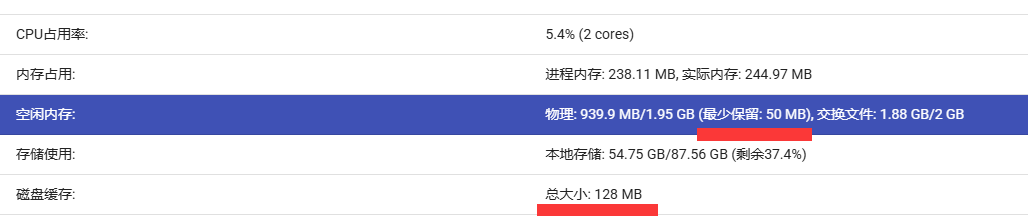
注:如果要修改配置文件请先停止容器,修改完成后在启动,这样才能修改成功
BitComet.xml 推荐设置
<?xml version="1.0" encoding="UTF-8" standalone="yes"?>
<BitComet>
<Settings>
<DiskCacheMaxSizeMB>256</DiskCacheMaxSizeMB>
<LTSeedCacheMaxSizeMB>256</LTSeedCacheMaxSizeMB>
<StartupAutoRunTask>true</StartupAutoRunTask>
<PassportLastUser></PassportLastUser>
<PassportLastUserPassword></PassportLastUserPassword>
<GlobalMaxUploadRate>10485760</GlobalMaxUploadRate>
<ConditionAutoStopTask>false</ConditionAutoStopTask>
<bittorrent.max_connections_per_ltseed>10</bittorrent.max_connections_per_ltseed>
<network.max_connections>1500</network.max_connections>
<ListenPort>6082</ListenPort>
<network.start_connect_interval_ms>0</network.start_connect_interval_ms>
<network.max_connecting_connections>60</network.max_connecting_connections>
<network.max_connecting_connections_per_tracker>10000</network.max_connecting_connections_per_tracker>
<network.tcp_connection_timeout>10</network.tcp_connection_timeout>
<LastSaveLocation>/root/Downloads</LastSaveLocation>
<bittorrent.enable_v1_upgrade_to_v2>true</bittorrent.enable_v1_upgrade_to_v2>
<bittorrent.torrent_http_try_max_count>1000</bittorrent.torrent_http_try_max_count>
<bittorrent.torrent_http_try_interval>5</bittorrent.torrent_http_try_interval>
<system.compact_memory_interval>0</system.compact_memory_interval>
<dht.udp_send_queue_threshold>1</dht.udp_send_queue_threshold>
<network.dns_query_thread_count>100</network.dns_query_thread_count>
<network.enable_open_dns>false</network.enable_open_dns>
<EnableDHT>false</EnableDHT>
<bittorrent.anti_leech_stable_sec>180</bittorrent.anti_leech_stable_sec>
<bittorrent.anti_leech_min_byte>10000</bittorrent.anti_leech_min_byte>
<bittorrent.anti_leech_banned_ports>15000</bittorrent.anti_leech_banned_ports>
<bittorrent.anti_leech_banned_peer_ids>XL0018</bittorrent.anti_leech_banned_peer_ids>
<RssFetchInterval>2</RssFetchInterval>
<RssFeedMaxItems>5</RssFeedMaxItems>
<EnableAutoDownloadRssTorrent>true</EnableAutoDownloadRssTorrent>
<bittorrent.utp_after_holepunch>0</bittorrent.utp_after_holepunch>
<bittorrent.save_connected_peers_only>true</bittorrent.save_connected_peers_only>
<bittorrent.separate_sources_for_failed_piece>false</bittorrent.separate_sources_for_failed_piece>
<bittorrent.max_torrent_size_mb>100</bittorrent.max_torrent_size_mb>
<HttpDownloadTryAgainMaxCount>10000</HttpDownloadTryAgainMaxCount>
<HttpDownloadDefaultConnectionNumber>300</HttpDownloadDefaultConnectionNumber>
<http.max_mirror_count>1000</http.max_mirror_count>
<HttpDownloadConnectionCacheSize>16777216</HttpDownloadConnectionCacheSize>
<TotalUpload>0</TotalUpload>
<TotalDownload>0</TotalDownload>
<WebInterfaceUsername>admin</WebInterfaceUsername>
<WebInterfacePassword>itzmx.com</WebInterfacePassword>
<WebInterfacePort>6080</WebInterfacePort>
<EnableAddTrackerList>true</EnableAddTrackerList>
<TrackerListForNewTorrent>http://tracker1.itzmx.com:8080/announce
http://tracker2.itzmx.com:6961/announce
http://tracker3.itzmx.com:6961/announce
http://tracker4.itzmx.com:2710/announce
udp://tracker1.itzmx.com:8080/announce
udp://tracker2.itzmx.com:6961/announce
udp://tracker3.itzmx.com:6961/announce
udp://tracker4.itzmx.com:2710/announce
http://tracker.opentrackr.org:1337/announce
udp://tracker.opentrackr.org:1337/announce</TrackerListForNewTorrent>
<TrackerListUpdateUrl>http://github.itzmx.com/1265578519/OpenTracker/master/tracker.txt</TrackerListUpdateUrl>
<TrackerListUpdateUrlList>http://github.itzmx.com/1265578519/OpenTracker/master/tracker.txt</TrackerListUpdateUrlList>
<EnableBtTaskIpFilter>true</EnableBtTaskIpFilter>
</Settings>
</BitComet>
注:v2.12.3版network.tcp_connection_timeout不起效果,会强制默认值为128秒超时,也就是说这个v2.12.3版本可以调整network.max_connecting_connections为750,后续修复了在改回60
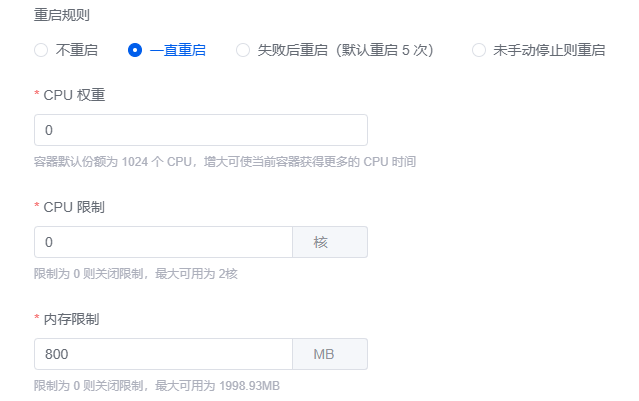
比如1GB内存实际程序占用used 800MB以内比较合适。
也就是说,centos7下要控制used在75%,避免超过80%,超过容易被kill杀进程
1G内存的vps运行docker上可以设置如下,检测应用程序占用800MB内存就自动重启容器(容器化后额外内存开销可能要设置为700MB)
内存 ≤ 4GB 的vps服务器也可以把内存保留改为300MB(不过Linux版本这个选项当前版本也没起效果,配置文件有效,但是实际上磁盘缓存没有进行下降)
<MinFreePhysMemMB>300</MinFreePhysMemMB>